
Color-Coded Weekly Excel Reports with Dynamic Columns in SugarCRM
July 21, 2026
How we export a weekly activity report from SugarCRM as a formatted .xls file — with merged section headers, per-activity dynamic columns, and color-highlighted cells.
The Problem
Our operations team needed a weekly snapshot of staff activity — how many students each worker called, how many were waiting for follow-up, and how long each connection took. SugarCRM’s built-in reports couldn’t produce this layout: the activity columns were dynamic (driven by database records), and the team needed color-coded sections to scan the sheet quickly. We built a custom export using Spreadsheet_Excel_Writer directly from a SugarCRM controller action.
What We Built
A controller action on the PT_weekly_report module that generates a complete formatted Excel workbook and streams it to the browser. The report has three visually distinct sections with merged headers, dynamic per-activity columns populated via JOIN queries, and cell-level color highlighting for non-zero values.
How It Works
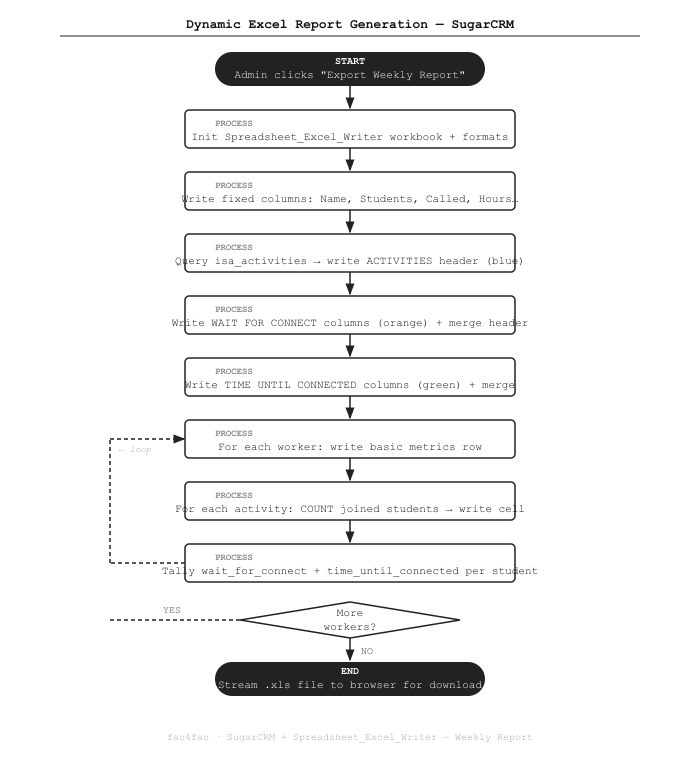
The Code
Setting up the workbook and formats
The workbook is created in-memory. We define format objects for each header color once, then reuse them:
require_once('vendor/pear/spreadsheet_excel_writer/Writer.php');

$workbook  = new Spreadsheet_Excel_Writer();
$worksheet = $workbook->addWorksheet('Weekly Report');

// Bold format for all section header cells
$format_bold = $workbook->addFormat();
$format_bold->setBold();
$format_bold->setFgColor(5);  // Blue — used for ACTIVITIES header

// We'll set per-section colors on separate format objects
$format_orange = $workbook->addFormat();
$format_orange->setBold();
$format_orange->setFgColor(41);  // Orange — WAIT FOR CONNECT

$format_green = $workbook->addFormat();
$format_green->setBold();
$format_green->setFgColor(42);  // Green — TIME UNTIL CONNECTED

// Send to browser as .xls download
$workbook->send('weekly-report.xls');
Writing the three color-coded section headers
Each section header spans multiple columns using setMerge(). The activity columns are dynamic — we query isa_activities first to know how many columns to span:
public function general_header(&$workbook, &$worksheet, &$row, &$col, $format_bold)
{
    // Fixed columns: Name, Students, Called, Hours
    $worksheet->write($row, 0, 'Name',     $format_bold);
    $worksheet->write($row, 1, 'Students', $format_bold);
    $worksheet->write($row, 2, 'Called',   $format_bold);
    $worksheet->write($row, 3, 'Hours',    $format_bold);
    $col = 4;

    // --- ACTIVITIES section (blue) ---
    $format_blue = $workbook->addFormat();
    $format_blue->setBold();
    $format_blue->setFgColor(5);

    // Query activities dynamically
    $activities_result = $GLOBALS['db']->query(
        "SELECT id, name FROM isa_activities WHERE deleted=0 ORDER BY name"
    );
    $activities = [];
    while ($act = $GLOBALS['db']->fetchByAssoc($activities_result)) {
        $activities[] = $act;
    }
    $act_start = $col;
    foreach ($activities as $act) {
        $worksheet->write($row + 1, $col, $act['name'], $format_bold);
        $col++;
    }
    // Merge header across all activity columns
    $worksheet->setMerge($row, $act_start, $row, $col - 1);
    $worksheet->write($row, $act_start, 'ACTIVITIES', $format_blue);

    // --- WAIT FOR CONNECT section (orange) ---
    $format_orange = $workbook->addFormat();
    $format_orange->setBold();
    $format_orange->setFgColor(41);
    $wfc_start = $col;
    $worksheet->write($row + 1, $col++, 'New',     $format_bold);
    $worksheet->write($row + 1, $col++, 'Waiting', $format_bold);
    $worksheet->write($row + 1, $col++, 'Total',   $format_bold);
    $worksheet->setMerge($row, $wfc_start, $row, $col - 1);
    $worksheet->write($row, $wfc_start, 'WAIT FOR CONNECT', $format_orange);

    // --- TIME UNTIL CONNECTED section (green) ---
    $format_green = $workbook->addFormat();
    $format_green->setBold();
    $format_green->setFgColor(42);
    $tuc_start = $col;
    $worksheet->write($row + 1, $col++, 'Avg (days)', $format_bold);
    $worksheet->write($row + 1, $col++, 'Min',        $format_bold);
    $worksheet->write($row + 1, $col++, 'Max',        $format_bold);
    $worksheet->setMerge($row, $tuc_start, $row, $col - 1);
    $worksheet->write($row, $tuc_start, 'TIME UNTIL CONNECTED', $format_green);

    return $activities;
}
Writing data rows with per-activity JOIN queries
For each worker, we run one JOIN query per activity to count students. Non-zero cells get a yellow highlight:
public function general_row(&$workbook, &$worksheet, $worker, $row, $activities)
{
    $format_highlight = $workbook->addFormat();
    $format_highlight->setFgColor(43); // Yellow highlight for non-zero cells

    $col = 0;
    $worksheet->write($row, $col++, $worker['full_name']);
    $worksheet->write($row, $col++, $worker['total_students']);
    $worksheet->write($row, $col++, $worker['calls_made']);
    $worksheet->write($row, $col++, $worker['hours_worked']);

    // Per-activity student counts
    foreach ($activities as $act) {
        $sql = "SELECT COUNT(s.id) AS cnt
                FROM isa_students s
                JOIN isa_students_isa_activities_1 rel
                  ON rel.isa_students_ida = s.id AND rel.deleted = 0
                WHERE rel.isa_activities_idb = '{$act['id']}'
                  AND s.assigned_user_id = '{$worker['id']}'
                  AND s.deleted = 0";

        $result = $GLOBALS['db']->query($sql);
        $data   = $GLOBALS['db']->fetchByAssoc($result);
        $count  = (int)$data['cnt'];

        // Highlight non-zero cells so they're easy to spot
        $fmt = ($count > 0) ? $format_highlight : null;
        $worksheet->write($row, $col++, $count, $fmt);
    }

    // Wait for connect aggregates (tally from student records)
    $wfc = $this->get_wait_for_connect($worker['id']);
    $worksheet->write($row, $col++, $wfc['new']);
    $worksheet->write($row, $col++, $wfc['waiting']);
    $worksheet->write($row, $col++, $wfc['total']);

    // Time until connected aggregates
    $tuc = $this->get_time_until_connected($worker['id']);
    $fmt_tuc = ($tuc['avg'] > 0) ? $format_highlight : null;
    $worksheet->write($row, $col++, $tuc['avg'], $fmt_tuc);
    $worksheet->write($row, $col++, $tuc['min']);
    $worksheet->write($row, $col++, $tuc['max']);
}
Streaming the file to the browser
Once all rows are written, close() flushes the workbook to the HTTP response:
/ In the main action method:
$workbook->send('weekly-report-' . date('Y-m-d') . '.xls');

$row = 0;
$activities = $this->general_header($workbook, $worksheet, $row, $col, $format_bold);
$row += 2; // skip header + subheader rows

$workers = $this->get_all_workers();
foreach ($workers as $worker) {
    $this->general_row($workbook, $worksheet, $worker, $row, $activities);
    $row++;
}

$workbook->close(); // streams file, exits
Key Points
- Dynamic columns. Activity columns are not hardcoded — they’re driven by whatever is in
isa_activities. Add a new activity to the CRM and it appears in the next export automatically. - Merged color headers.
setMerge()+setFgColor()makes the three sections visually distinct at a glance. Color index 5/41/42 maps to Excel’s built-in blue/orange/green palette. - Cell-level highlighting. Non-zero cells get a yellow background so the reader’s eye is drawn to activity immediately, without needing to scan numbers row by row.
- Zero framework overhead. The PEAR library writes directly to the XLS binary format. No Excel installation, no temporary files — the workbook streams inline as the HTTP response.
Stack
PHP · SugarCRM Custom Controller · Spreadsheet_Excel_Writer (PEAR) · MySQL
Need custom reporting out of SugarCRM? Get in touch →